

Microsoft announced general availability of Copilot Managed Runtime at Ignite on 17 November 2026, and the CLI and SDK reached 1.0.0 on npm the same day. If you built apps during the preview, you have a CLI to swap and packages to rename in every app repo. The Vite plugin also renamed its export, so renaming the packages alone breaks your build.
Licensing needs a look before preview apps go to production, because Microsoft bills runtime usage per API call.
What changed at GA
Microsoft renamed the packages on 4 November, during the preview, and published @microsoft/cmr-cli and @microsoft/cmr-apps 1.0.0 to npm early on 17 November, hours before the Ignite keynote.
| Preview package | Last preview version | GA package (1.0.0) |
|---|---|---|
@microsoft/managed-apps-cli | 0.32.2 | @microsoft/cmr-cli |
@microsoft/managed-apps | 0.6.3 | @microsoft/cmr-apps |
@microsoft/managed-apps-vite-plugin | 0.4.8 | @microsoft/cmr-apps-vite-plugin |
The CLI command is still ms. The latest versions of the old packages are from 3 November, and Microsoft hasn’t marked them deprecated on npm. The old CLI has no update check either, so nothing tells you that you’re deploying to a GA runtime with a preview CLI.
If you installed @microsoft/cmr-cli between 4 and 16 November, you have a 0.3x version of the new package. npm install -g @microsoft/cmr-cli takes you to 1.0.0, and you can skip the uninstall step below.
The developer page on Microsoft Learn no longer has a preview label and uses the new package names.
Upgrade the CLI
Both packages register the ms command. If you install @microsoft/cmr-cli while the preview CLI is still installed, npm refuses:
npm error code EEXIST
npm error EEXIST: file already exists
npm error Remove the existing file and try again, or run npm
npm error with --force to overwrite files recklessly.
Skip --force. Uninstall the preview CLI first, then install the new one. This is my upgrade on Windows:
PS> npm uninstall -g @microsoft/managed-apps-cli
removed 55 packages in 5s
PS> npm install -g @microsoft/cmr-cli
added 18 packages in 11s
PS> ms --version
1.0.0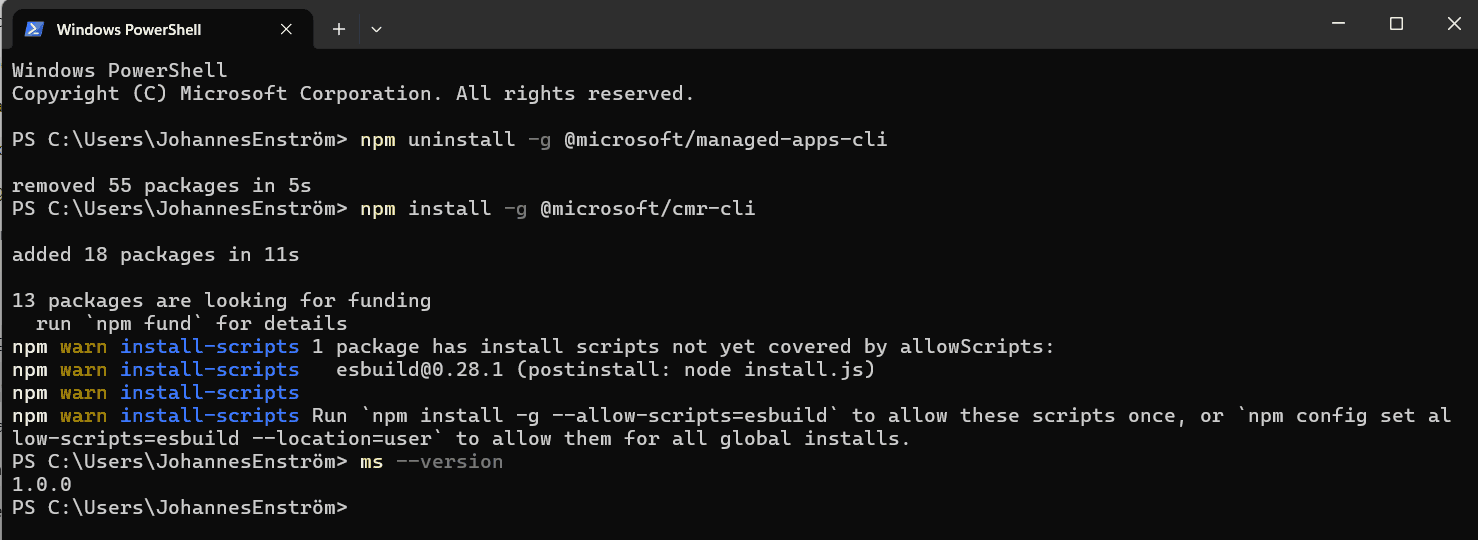
Newer npm versions warn during the install that esbuild’s postinstall script isn’t covered by allowScripts. You can ignore that. esbuild finds its native binary through its platform package, and with npm 12 blocking the script, esbuild in the CLI still compiles TypeScript. To allow the script for future global installs, which also stops the warning, run npm config set allow-scripts=esbuild --location=user.
The 1.0 CLI has the same ms app commands as 0.32.2 (create, init, dev, build, deploy, share and the rest), so scripts that call them should keep working. Microsoft deprecated ms app show in favour of ms app info, and 1.0 adds an ms admin group with add and remove for administrative access to managed resources.
Migrating a preview app
I migrated my own test app to see what breaks. It’s a task manager I generated with GitHub Copilot from the Vite 8 template on 1 October, during the preview.
Check which CLI the project runs
The preview CLI’s ms app create and ms app init add @microsoft/managed-apps-cli to the app’s devDependencies. npm scripts and npx ms use that local copy before your global one. In my project, with 1.0.0 installed globally, npx ms still ran 0.26.0:

Swap the packages
npm uninstall @microsoft/managed-apps @microsoft/managed-apps-vite-plugin @microsoft/managed-apps-cli
npm install @microsoft/cmr-apps
npm install -D @microsoft/cmr-apps-vite-plugin @microsoft/cmr-cli
Then replace @microsoft/managed-apps/ with @microsoft/cmr-apps/ across the repo. Keep the trailing slash so the Vite plugin import doesn’t match. My own code under src had no SDK imports. The only two were in the generated file generated/services/TasksService.ts, both from @microsoft/managed-apps/data.
Fix the Vite plugin
vite.config.ts still imports the old plugin, so the first build fails with TS2307: Cannot find module '@microsoft/managed-apps-vite-plugin'. That error names the fix. After you change the package name, the build fails a second time:
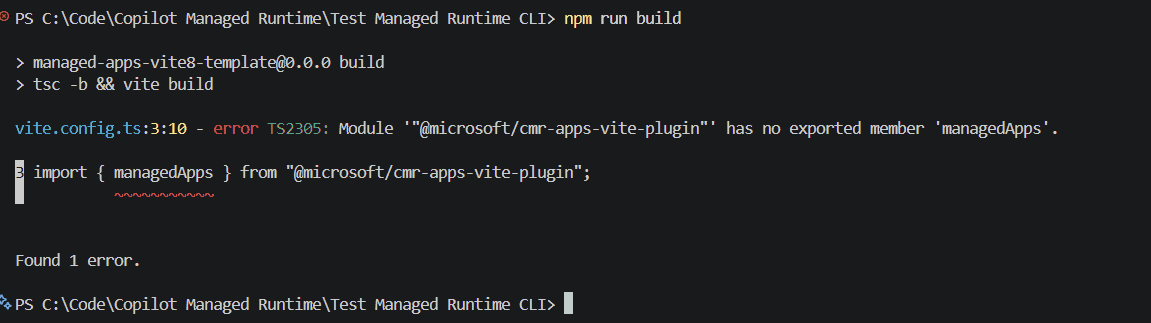
The plugin renamed its export from managedApps to copilotManagedRuntime and removed the old name. Rename both the import and the call:
import { copilotManagedRuntime } from "@microsoft/cmr-apps-vite-plugin";

// in defineConfig
plugins: [copilotManagedRuntime()],
After that, the build went through on Vite 8.3.2:
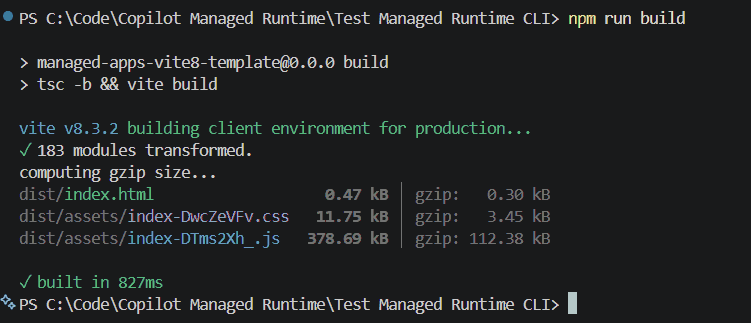
If you use the SDK’s rayfin entry point, initializeRayfin changed too. It now builds on Rayfin 2.0 services and fails instead of returning null when the app has no Rayfin backend. My app doesn’t import rayfin, so I haven’t tested that part.
Run the dev server
The 1.0 plugin runs the dev server in local gateway mode by default, and the Local Play URL now includes ms_localGatewayAppUrl:
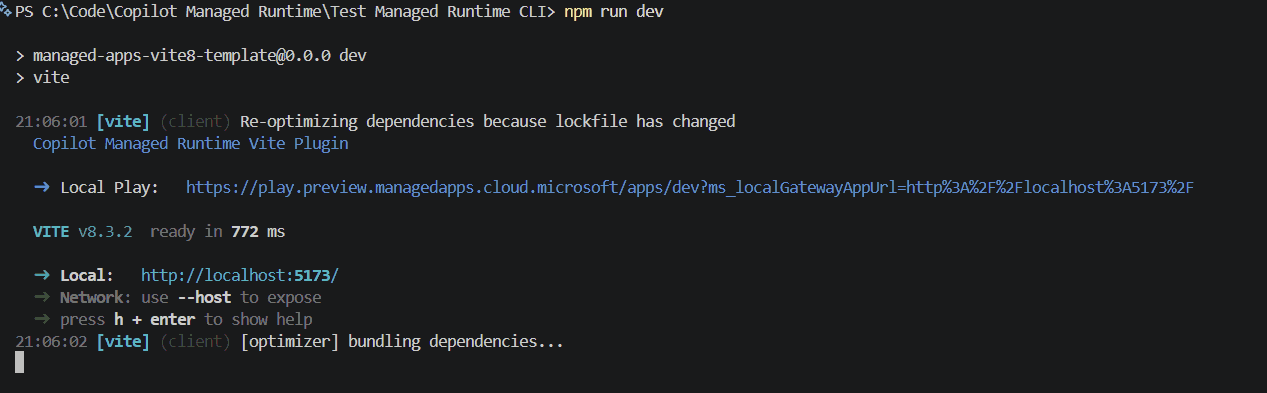
The app loaded in the player with its data, so the generated service works against the 1.0 SDK.
Local gateway mode needs an ms.config.json with the appId and environmentId of an existing app. Apps scaffolded with ms app create have one, mine included. Without it, Vite starts but prints no Local Play URL. Run ms app init, or switch back to the preview behaviour with copilotManagedRuntime({ devMode: 'direct' }).
Licensing before production
Microsoft bills runtime usage at 0.1 Copilot Credits per API call, according to the Copilot Credits Guide. Power Apps Premium covers its users up to the existing Premium request limits. Microsoft bills usage above those limits through Copilot Credits usage-based billing, the same as hosting, runtime and management of apps in general.
On top of the runtime, you pay credits for:
- Building the app in Cowork, Code or Copilot Studio. The cost depends on the model, how complex the app is and how much you iterate.
- Agents and Work IQ API calls from the app, which have their own usage-based billing.
- Fabric as a data backend (public preview), at a base rate of 0.005 Copilot Credits per second of Fabric compute, before adjustments for region, on-demand use and workload.
Before you share a preview app beyond your team, list who will run it and which of them have Power Apps Premium. As a rough example, an app that makes 20 API calls per session, opened twice a workday by 200 people without Premium, uses 200 × 2 × 20 × 0.1 = 800 Copilot Credits a day. Microsoft’s Copilot Credit Estimator does the same calculation across your whole app estate.
Outside the Premium inclusion every call costs credits, so cache what doesn’t change and load a list once instead of on every screen.
Checklist
- Uninstall
@microsoft/managed-apps-cli, install@microsoft/cmr-cli, and check thatms --versionsays 1.0.0. - In each app repo, swap to
@microsoft/cmr-appsand@microsoft/cmr-apps-vite-plugin, plus@microsoft/cmr-cliif the old CLI is indevDependencies. - Replace
@microsoft/managed-apps/in your imports with@microsoft/cmr-apps/. - Rename
managedApps()tocopilotManagedRuntime()invite.config.ts. - Check that
ms.config.jsonhasappIdandenvironmentId, or setdevMode: 'direct'. - Find out who will run the app and who of them has Power Apps Premium before you share it beyond your team.
What’s the first preview app you’re moving to production? Tell me in the comments.