
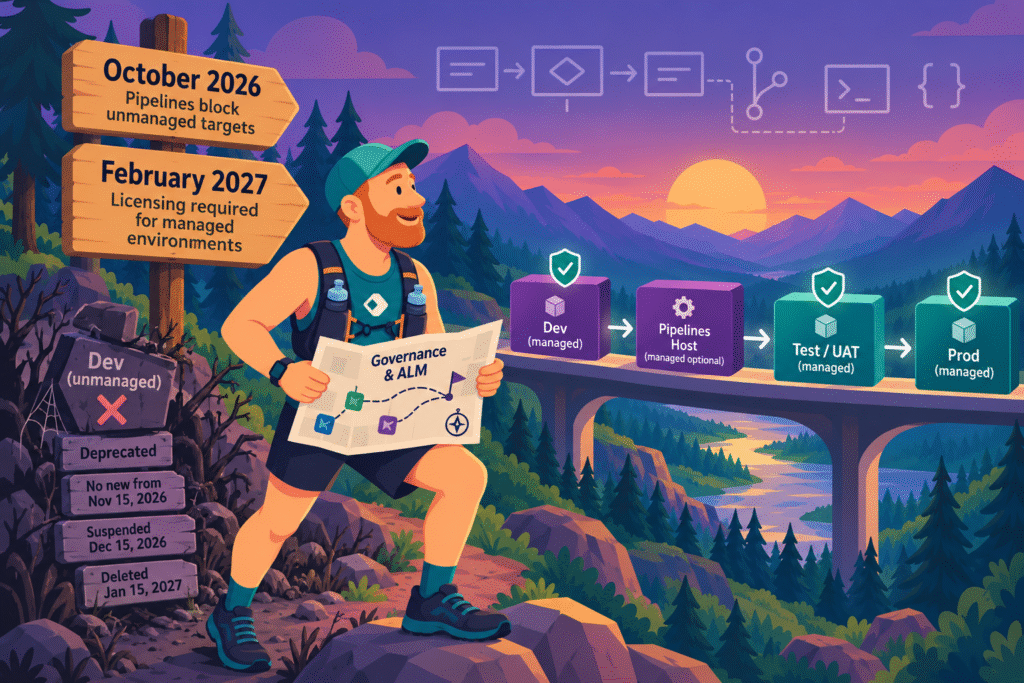
If a Power Platform pipeline in your tenant deploys to an environment that isn’t managed, that pipeline now has an expiry date. Since October 2026, the admin deployment page flags those targets. If nobody enables managed environments within 30 days of the notification, new deployments to that target are blocked. Admins can request one 30-day extension per environment.
None of my clients will hit this. Every target their pipelines deploy to is a managed environment, and always has been. A managed platform is also the first thing I bring up when we talk governance. Tenants set up differently now have a decision to make, and the quick fix has a cost that shows up a few months later.
“Have always been required”
That’s Microsoft’s wording. The admin deployment page FAQ says pipeline targets “have always been required to be managed environments for compliant usage”. On paper, nothing has changed.
In practice, a lot has. Until now, nothing blocked a pipeline from deploying to an unmanaged target. Solutions that are already deployed keep working; only new deployments stop. Makers can see the countdown and acknowledge the extension, but enabling managed environments takes an admin.
A managed environment is an environment with Microsoft’s premium governance controls switched on, such as sharing limits and data policies. A target is any environment a pipeline deploys to: test, UAT, production. The pipelines host and the development environments you deploy from don’t need to be managed, at least as far as pipelines are concerned.
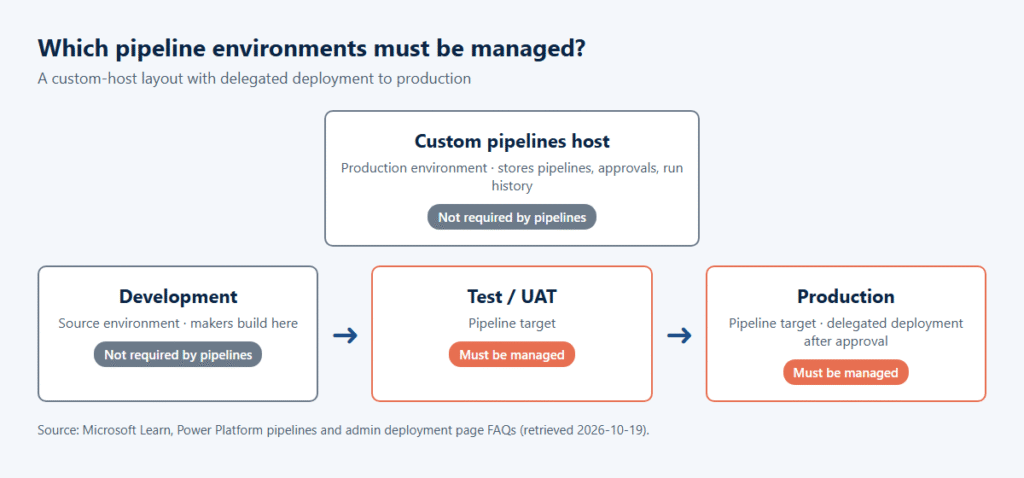
The documentation doesn’t quite agree with itself about QA. The pipelines FAQ shows an example setup where QA is a Developer-type environment that needs no standalone license. The admin FAQ applies the managed requirement to every target. And the licensing page says a managed environment “isn’t included as an entitlement in the Developer Plan when users run their assets”. The safe reading: QA is a target like any other, and it needs to be managed.
Microsoft is also retiring unmanaged Developer environments altogether (Microsoft Learn: important changes). You can’t create new ones from November 15, 2026. Existing ones are suspended from December 15, 2026, which makes their apps, flows and data unavailable, and deleted from January 15, 2027. Developer environments that are managed aren’t affected.
So a Developer-type dev or QA environment has to become managed, or move to a sandbox, regardless of pipelines. Either way, check who runs apps there. For tenants that still have unmanaged Developer environments, December 15 comes first, and it’s the one that ends in deletion.
The licensing deadline: February 2027
The pipeline side is easy to fix. Under Deployment > Settings, admins can turn on automatic conversion per pipelines host, and unmanaged targets become managed on their next deployment.
What that switch also does is put every user in those environments under the licensing rules for managed environments. All active usage needs a qualifying standalone license or a pay-as-you-go meter. Microsoft has been warning admins about this since March 2026 and users since June. From February 2027, users without an appropriate license can’t open apps in managed environments at all.
So converting a target is a licensing decision, made in a deployment settings screen.
For Dynamics 365 CE customers it’s mostly good news. Sales Enterprise, Customer Service Enterprise, Field Service and Team Members are on Microsoft’s list of licenses with premium usage rights. Each still has its own use rights, so check the licensing guide. The gaps tend to be elsewhere:
- Dynamics 365 Professional licenses cover Power Apps and Power Automate only within the context of the licensed Dynamics 365 application (Dynamics 365 Sales, for a Sales Professional user). Usage outside that context needs a qualifying license or a pay-as-you-go meter. Check the licensing guide for where that line goes.
- Everyone who runs apps in a managed QA or UAT target needs a qualifying license, including business testers. The Developer Plan doesn’t cover running apps in a managed environment.
Microsoft has a report for exactly this, called Users requiring licenses in Managed Environments. In the Power Platform admin center, it’s under Licensing > Power Apps > Summary > Download report.
Why I run a custom host
I use a custom pipelines host for every client. It has far more settings than the platform host, and the one I use most is delegated deployments. A stage then deploys as a service principal or the stage owner instead of the maker who requested it, and only after approval (Microsoft Learn: delegated deployments).
It also changes who gets to create pipelines in the first place. On the platform host, makers can create personal pipelines to environments they can import solutions into. Admins can make a custom host the tenant default, and personal pipelines on the platform host stop being an option.
A custom host takes some setup, though. You create a dedicated host environment under Deployment > New custom host, or install the pipelines application in an existing one. Then you grant access to makers yourself. Targets of a new custom host also convert to managed environments automatically (Microsoft Learn: custom host). So run the license report before you point a new host at existing targets. And it doesn’t get you out of the enforcement: Microsoft tells admins to review each pipelines host separately.
What I’d check first
- Unmanaged Developer environments, before December 15. Filter Manage > Environments on Type Developer and Managed No.
- Deployment > Environments to convert, for every pipelines host in the tenant.
- The license report above, for those environments, before converting anything.
- Which targets you actually need. Convert those. Retire the rest. (Good environment names make this step a lot easier.)
- Automatic conversion, once the licensing side is sorted.
Microsoft lists sharing limits, usage insights, data policies, solution checker and pipelines among the managed environments features. For pipeline targets, there’s now also a date attached.
See also: the role of the Power Platform administrator, structured ALM, and how to lock down Power Automate Desktop without managed environments.
Sources: Microsoft Learn pages linked above, retrieved 2026-10-19. Licensing terms change, so check the Microsoft Power Platform Licensing Guide before making purchasing decisions.

